 Wagtail
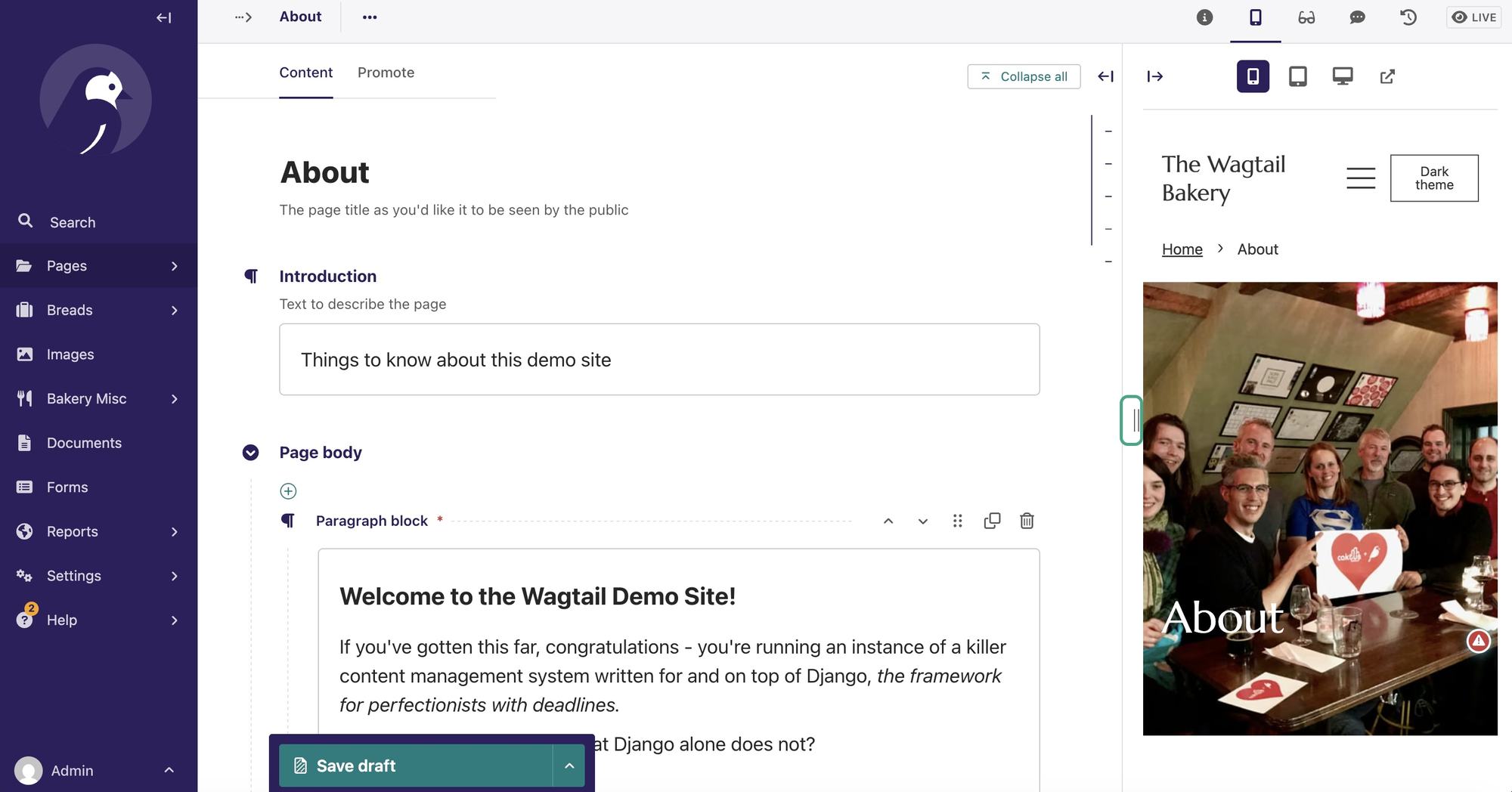
Many of you have probably heard of Wagtail CMS, but not everyone knows that Wagtail, in a nutshell, is a supercharged admin backend for Django. At least that's how I see it, and how I often pitch it to fellow Django developers.
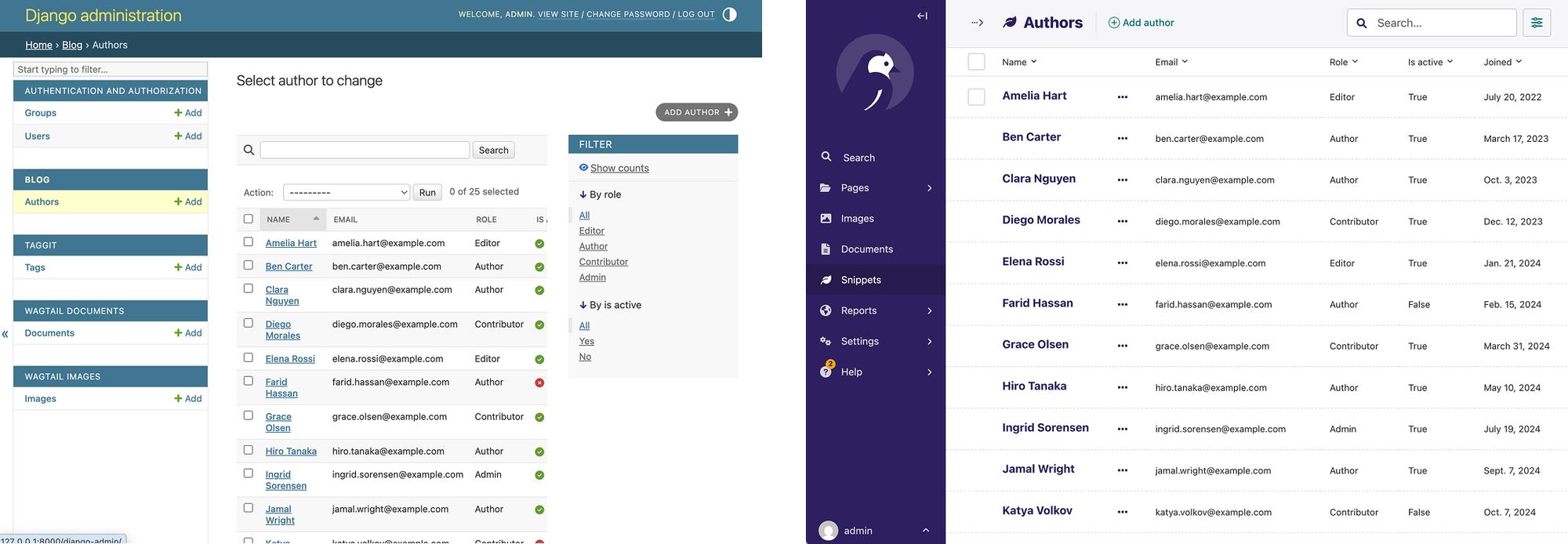
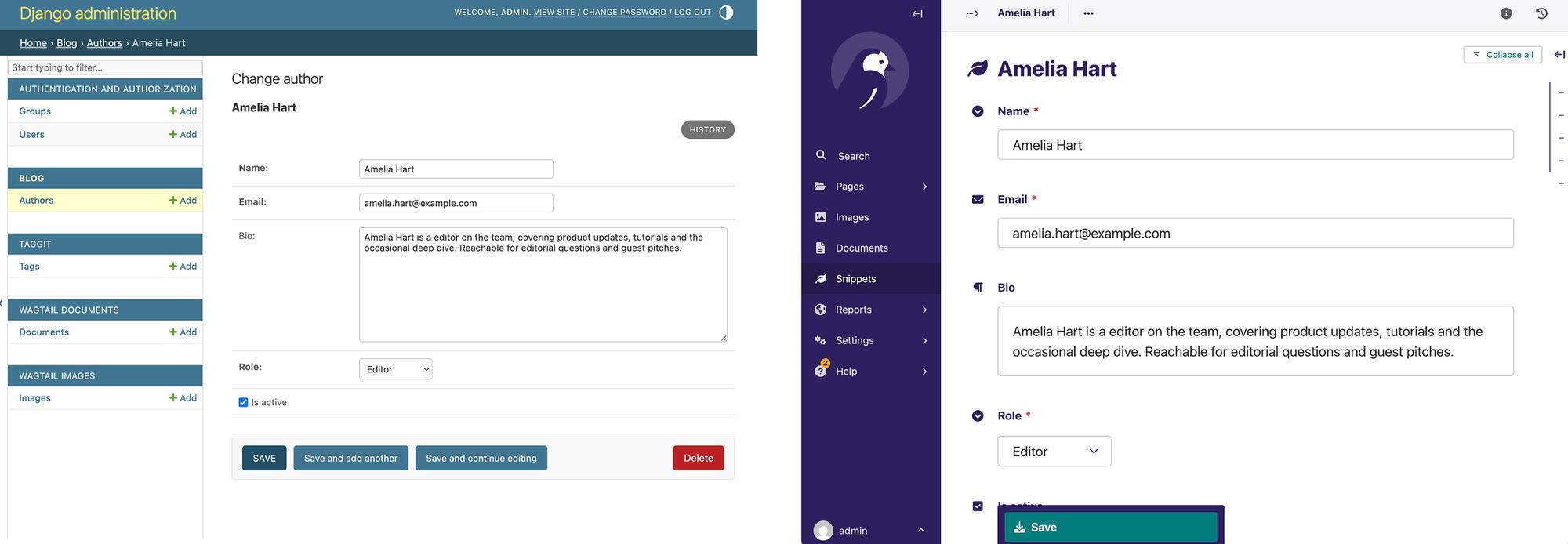
Django comes with its own django.contrib.admin, which offers plenty of goodness and is a crown jewel of the project, but it looks a bit dated and is painful to customize. The core developers are well aware of this — Django admin is advertised as a quick tool for building a UI around your models, and it's not recommended for non-developer users.
Making Django admin modern and more user-friendly would require a separate team working on it full time, which sounds unachievable. But I might surprise you here — such a team exists. An open source group of collaborators and hundreds of contributors that's been working on a slick Django admin UI for more than a decade. This is the Wagtail CMS team.
I believe Wagtail offers everything Django admin has and more, wrapped in a polished, eye-catching UI. It keeps evolving and has stood the test of time, having been on the market for over 12 years. And it's nothing like the CMSes you've used before.
When developers hear the word "CMS," they think of WordPress, Drupal, Joomla, or some other name. Usually those are powerful content management frameworks with their own limitations and conventions that force you to think and build around cruft accumulated over years of development. But the great thing about Wagtail is that it doesn't dictate how you build your business logic or the client-facing part — its only concern is the admin backend. When building with Wagtail, you don't give up your Django knowledge — you still use whatever class-based or function-based views you like, along with urls.py, forms, and templates.
Wagtail doesn't mess with how you build a Django project. It's just another Python package that you add to INSTALLED_APPS, and it gives you that nice admin UI with built-in primitives like Page models, an image library, and editorial workflows. But you aren't forced to use any of those primitives. If you don't care about Pages and all the CMSy fluff and just want a backend to list and edit your models — fine. You can skip those features and use Wagtail purely as a UI for your models, with a look you'd have no shame putting in front of a client. And in my experience, that Wagtail look is often a strong selling point for clients.
The API
What's interesting is that the API for registering a model is strikingly similar between Django admin and Wagtail, so it feels like a drop-in replacement. See for yourself:
Django (<your_app_name>/admin.py):
from django.contrib import admin
from .models import Author


@admin.register(Author)
class AuthorAdmin(admin.ModelAdmin):
    list_display = ("name", "email", "role", "is_active", "joined")
    list_filter = ("role", "is_active")
    search_fields = ("name", "email", "bio")
    ordering = ("name",)
    list_per_page = 50
    fields = ("name", "email", "bio", "role", "is_active")
Wagtail (<your_app_name>/admin.py):
from wagtail.admin.panels import FieldPanel
from wagtail.snippets.models import register_snippet
from wagtail.snippets.views.snippets import SnippetViewSet
from .models import Author


@register_snippet
class AuthorViewSet(SnippetViewSet):
    model = Author
    list_display = ("name", "email", "role", "is_active", "joined")
    list_filter = ("role", "is_active")
    search_fields = ("name", "email", "bio")
    search_backend_name = None
    ordering = ("name",)
    list_per_page = 50
    panels = [
        FieldPanel("name"),
        FieldPanel("email"),
        FieldPanel("bio"),
        FieldPanel("role"),
        FieldPanel("is_active"),
    ]
Looks familiar, right? There's not much new to learn. Wagtail leans on the API you've been writing for years.
Solving Django admin pain points
On top of that, using Wagtail as your admin panel fixes the things that have nagged Django devs for years:
- Want an admin you're not embarrassed to show a client? That's the headline — the Wagtail team pours serious effort into polishing it.
- Want full control over how fields are displayed, ordered, and grouped, inlines included? That's what Panels are for, and they're endlessly flexible.
- Want model versioning? One mixin away.
- Want to customize an admin template? Drop an override in your templates dir and you're done.
- Want a rich text editor? Wagtail ships a sleek one.
- Want composable blocks for dynamic landing pages or free-form models? Meet StreamFields.
- Outgrown your business-only app and need a blog or an editorial section?
PageandImagemodels have you covered — draft/moderation/published workflows and a media library included. - Want to restrict parts of the admin by user role? Built in — group-based permissions handle it.
I could go on all day, but I'll stop here and suggest you take it slow: add Wagtail to an existing Django project, translate your admin.py into Wagtail, and take it from there.
Adding Wagtail to your Django project
Being a Django package, Wagtail takes just a few new lines in your Django settings.py to set up. Here's a quick getting-started guide:
-
Install Wagtail:
pip install wagtail -
Append
RedirectMiddlewareto the end of yourMIDDLEWARE:MIDDLEWARE = [ # ... "wagtail.contrib.redirects.middleware.RedirectMiddleware", ] -
Prepend the Wagtail packages to the beginning of
INSTALLED_APPS:INSTALLED_APPS = [ "wagtail.contrib.forms", "wagtail.contrib.redirects", "wagtail.embeds", "wagtail.sites", "wagtail.users", "wagtail.snippets", "wagtail.documents", "wagtail.images", "wagtail.search", "wagtail.admin", "wagtail", ..., ] -
Add the URL configuration to
urls.py:from django.conf import settings from django.conf.urls.static import static from django.contrib import admin from django.urls import include, path, re_path from wagtail.admin import urls as wagtailadmin_urls from wagtail.documents import urls as wagtaildocs_urls from wagtail import urls as wagtail_urls urlpatterns = [ # Usually I remove this path as I don't need Django admin anymore path("django-admin/", admin.site.urls), path("admin/", include(wagtailadmin_urls)), path("documents/", include(wagtaildocs_urls)), # ... your vanilla Django app urls go here # Any urls not caught by the Django apps above will fall through to Wagtail re_path(r"", include(wagtail_urls)), ]
Stepping one level up
And if you ever decide to reach for the CMS side of Wagtail, I can assure you it's top notch. You get a hierarchical page structure, a media library for images and documents, an editorial workflow with draft, in-moderation, and published statuses, versioning, and a whole bunch of other cool features that fall outside the scope of this post. When I pitch Wagtail to clients, I like to show them this user-friendly editorial guide. It's written with content editors in mind and showcases the interfaces and features Wagtail CMS brings to the table. I highly recommend going through it: https://guide.wagtail.org/
Conclusion
Start with the admin replacement — that alone is worth it. But don't be surprised when you reach for a rich text field, then a versioned model, then a full editorial workflow. That's how Wagtail gets you: it comes in as a better admin and stays as a CMS.
Hey, if you've found this useful, please share the post to help other folks find it: