 Wagtail
Show and hide Wagtail admin fields without writing any JavaScript
Sep 28, 2026 · by Tim Kamanin
Oh boy, I love Wagtail. Haven't I said this too many times on this blog? I recently built a small promo banner for a client's Wagtail site. The editor form was simple: some text, a button label, and a "Button links to" radio with two options, "Page" or "External URL". Below it sat a page chooser and a URL input, something like this:
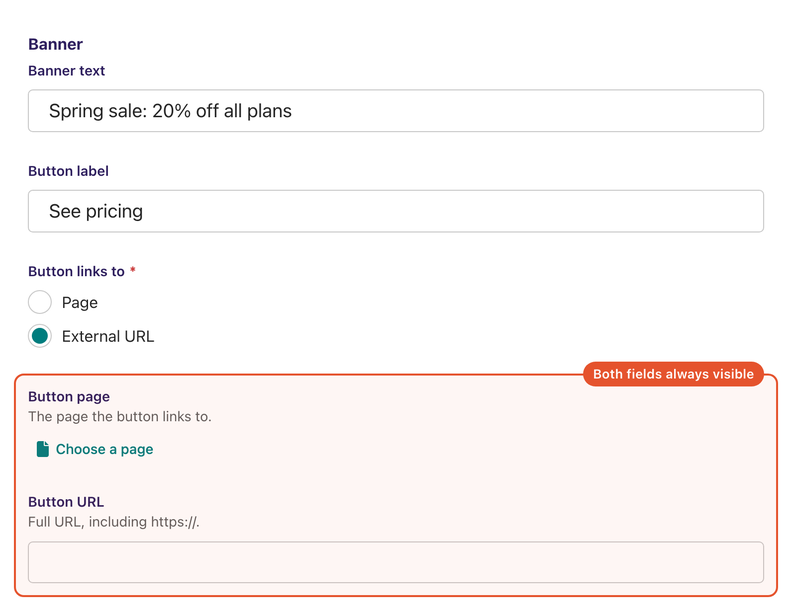
It worked, but both fields were always on screen, and only one of them ever mattered. Look at the screenshot: "External URL" is selected, and the page chooser still sits right there, asking to be filled in. An editor would look at it and wonder if they need to pick a page too. I would have wondered the same.
So the goal was simple: show the field that matches the radio and hide the other one.
My first instinct was to write some JavaScript
On this project we wrap UI behavior into small web components. So I was already halfway into planning a <conditional-field> element, loaded into the admin through an insert_global_admin_js hook: listen for the radio, toggle a class, maybe an hour of work.
Then I stopped and checked what Wagtail ships. The admin runs on Stimulus these days, a small JavaScript framework from the Basecamp folks that attaches behavior to plain HTML through data- attributes. Wagtail ships quite a few ready-made Stimulus controllers. One of them, w-rules, does exactly what I was about to write.
Meet the RulesController
w-rules is the name Wagtail registers it under. It enables or shows an element depending on the values of other fields in the same form. The Wagtail docs demonstrate it on plain HTML:
<form data-controller="w-rules" data-action="change->w-rules#resolve">
  <select name="fav-drink" required>
    <option value="">Select a drink</option>
    <option value="coffee">Coffee</option>
    <option value="other">Other</option>
  </select>
  <input
    type="text"
    name="other-drink"
    data-w-rules-target="show"
    data-w-rules='{"fav-drink": ["other"]}'
  />
</form>
Choose "Other" and the text input appears. Anything else hides it.
The show target arrived in Wagtail 7.2, so you'll need that version or newer. The controller itself has been around since 6.4, but back then it could only enable and disable fields, not hide them. I'm on 7.4 for this project.
The catch in the admin is that you don't write the form HTML. Wagtail renders it from your panels. So the question became: how do I get those attributes onto the right elements?
Panels take an attrs argument
It turns out panels accept an attrs dictionary, and Wagtail renders it as HTML attributes on the panel's wrapper. Which means we can inject Stimulus attributes into panels! That's all I needed.
Here's the model, trimmed down to the relevant parts:
import json

from django import forms
from django.db import models
from wagtail.admin.panels import FieldPanel, MultiFieldPanel
from wagtail.models import Page


class LinkType(models.TextChoices):
    PAGE = "page", "Page"
    URL = "url", "External URL"


def show_for(link_type):
    """
    Panel attrs that show a field only while the "Button links to" radio is `link_type`.
    """
    return {
        "data-w-rules-target": "show",
        "data-w-rules": json.dumps({"cta_link_type": [link_type.value]}),
    }


class HomePage(Page):
    cta_link_type = models.CharField(
        "Button links to",
        max_length=10,
        choices=LinkType.choices,
        default=LinkType.PAGE,
    )
    cta_page = models.ForeignKey(
        "wagtailcore.Page",
        verbose_name="Button page",
        null=True,
        blank=True,
        on_delete=models.SET_NULL,
        related_name="+",
        help_text="The page the button links to.",
    )
    cta_url = models.URLField(
        "Button URL",
        blank=True,
        help_text="Full URL, including https://.",
    )

    content_panels = Page.content_panels + [
        MultiFieldPanel(
            [
                FieldPanel("cta_link_type", widget=forms.RadioSelect),
                FieldPanel("cta_page", attrs=show_for(LinkType.PAGE)),
                FieldPanel("cta_url", attrs=show_for(LinkType.URL)),
            ],
            heading="Banner",
            attrs={
                "data-controller": "w-rules",
                "data-action": "change->w-rules#resolve",
            },
        ),
    ]
Those attribute names come from Stimulus, not from Wagtail. data-controller="w-rules" picks the controller, and it covers that element plus everything inside it, which is why it sits on the panel. data-action maps an event to a method: a change anywhere in the panel calls resolve(). On each field, data-w-rules-target="show" marks it as something the controller manages, and data-w-rules carries the rule itself, the field name and the values that should reveal it. It's JSON because an attribute can only hold a string.
So Python's whole job here is writing the right strings. Nothing imports anything, nothing talks to anything, which is why the one way to break this is a typo.
That's the entire change. There's no JavaScript to write, which still feels slightly like cheating.
And here's the same form after the change, with "External URL" selected:
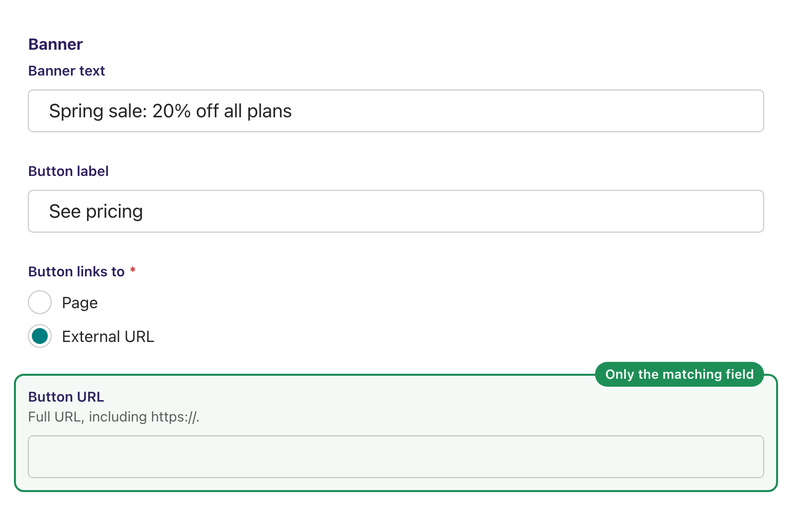
The page chooser is gone. Switch the radio to "Page" and the two swap places: the URL input hides and the page chooser comes back.
That holds on first load too, not just on click. The controller resolves its rules as soon as the fields appear, so the unused one is hidden before the editor touches anything, even when Wagtail re-renders the form after a validation error.
Hidden doesn't mean gone
One thing to watch: hiding here means the hidden attribute, so the field is still part of the form and still posts its value. So your model should only care about the field the radio points at. My clean() validates just that one, and the property that builds the link reads only the selected side:
@property
def cta_link(self):
    if self.cta_link_type == LinkType.URL:
        return self.cta_url or None
    if self.cta_page and self.cta_page.live:
        return self.cta_page.url
    return None
If an editor picks a page, changes their mind and switches to "External URL", the old page stays in the database and nothing uses it. I'm fine with that.
If the JavaScript ever fails to load, both fields show up, same as before.
I also added a test that renders the edit form and checks that the attributes landed on the right elements. I trust Wagtail to maintain the controller, but the attributes I added are my responsibility to test.
Bottom line
I came very close to shipping a custom web component for something Wagtail already had. It would have worked fine, but it's code I'd have to maintain, and Wagtail already maintains this one for me. Next time I'll read through the list of built-in controllers before I start.
If this saves you from writing another admin JS hook, I'd appreciate you sharing the post. Thank you and take care!
Hey, if you've found this useful, please share the post to help other folks find it: